
Basic tips
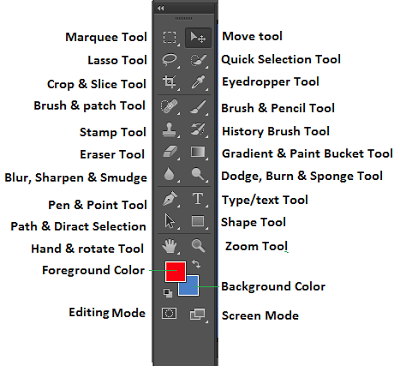
Here is where all of the simple tools and tips for beginners are. You will find how to use the simple tools and begin to manipulate your photos by cropping and re-sizing them.
Here is where all of the simple tools and tips for beginners are. You will find how to use the simple tools and begin to manipulate your photos by cropping and re-sizing them.

If you want to remove parts of the image then you will need to use the crop tool. You can find this in the toolbar next to the eydropper and the quick selection/magic wand tool. Once you have selected the tool you then want to drag the tool to select the area of the image you would like. Once you have selected the are you need to click the tick in the top right corner. This will get rid of anything outside area you selected and leave you with smaller image.

When in Photoshop, if you want to make the image a different size then you will need to use the free transform tool. This tool can be found in the edit tab at the top of the page. You can also just click Crtl and T and it will allow you to edit the image. After you click that you can re-size, rotate and flip the image.
| Basic tips | Effects | Techniques | Portfolio | Software | Contact us | Music |
crop |
filters |
double exposure |
slideshow |
specs |
send a message |
spotify playlists |
scale |
text |
waterpainting |
alternatives |


